Why Remedy Is Still On Your Estate
If you run a Fortune 1000 IT shop, there is a good chance BMC Remedy is still buried somewhere — handling incidents, change tickets, asset records, and a tangle of 15-year-old escalation rules nobody dares to touch. Most modernization programs that try to lift this onto ServiceNow stall for the same reason: nobody fully understands what Remedy is actually doing anymore.
The original architects are gone. The documentation, if it exists, describes the 2012 implementation. The active filters, escalations, workflows, AR forms, and integrations have been patched by dozens of admins over a decade. A traditional migration approaches this by hiring a large SI team to manually re-document everything before rebuilding it in ServiceNow. That is an 18–24 month project, often with low fidelity.
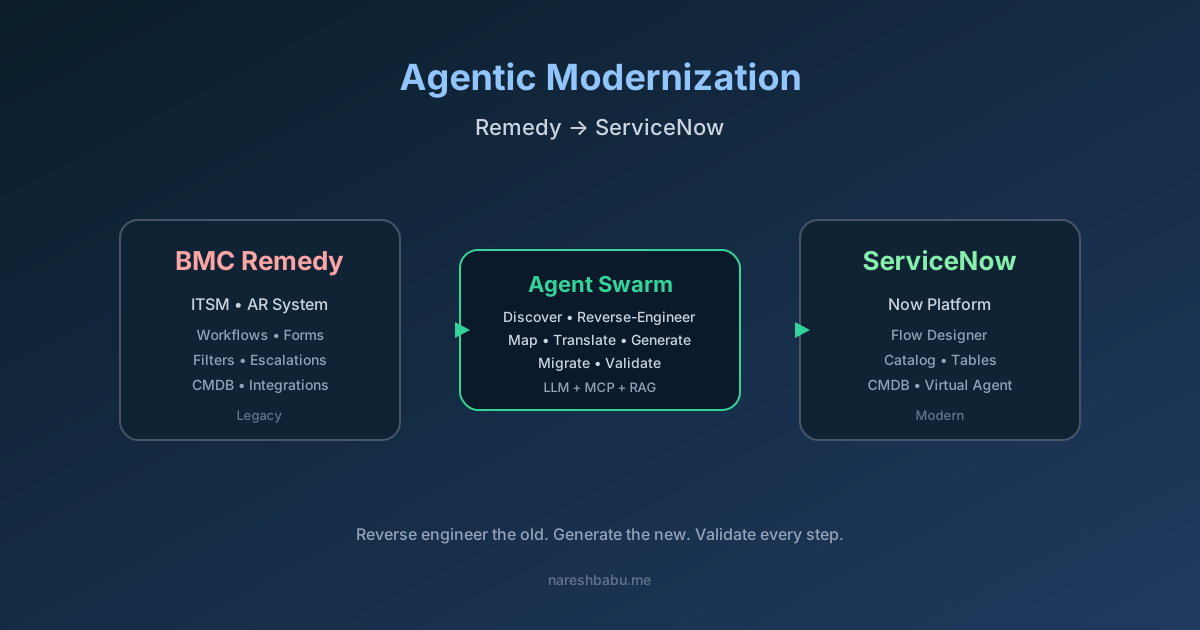
There is a better path now: treat Remedy as a system to be reverse engineered by a swarm of AI agents, with humans in the loop for design judgment and validation. Done right, an agentic modernization compresses discovery from quarters to weeks and turns migration into a continuous, auditable pipeline.
This post walks through how I would actually run that program.
The Core Idea: Agents as Senior Consultants, Not Scripts
The mistake most teams make is treating agents like macros — “extract this table, push it there.” That is just ETL with extra steps. The real value comes from using agents as specialists that mirror the roles you would otherwise hire:
- A discovery agent that behaves like a Remedy SME, crawling the AR System schema and producing a living inventory.
- A reverse-engineering agent that reads workflow definitions, filters, and escalations and translates them into intent — “what is this rule actually trying to achieve?”
- A mapping agent that aligns Remedy concepts to ServiceNow constructs (tables, Flow Designer, Catalog, CMDB CIs).
- A generation agent that produces ServiceNow artifacts — Update Sets, Flows, Business Rules, Script Includes.
- A validation agent that replays historical tickets through the new platform and diffs outcomes.
Each agent has a narrow scope, a defined tool surface (typically over MCP), and a structured output that the next agent can consume. A human architect owns the orchestration and signs off at every checkpoint.
Phase 1: Reverse Engineer Remedy
This is where most of the value is created, because Remedy’s complexity is rarely encoded in any one place. You have to assemble the picture from multiple sources.
What to Extract
A discovery agent needs read-only access to:
- The AR System schema — forms, fields, field permissions, display properties. This is your data model.
- Active links, filters, and escalations — the behavior layer. Active links run on the client, filters on the server, escalations on a schedule. Each is essentially a rule with conditions and actions.
- Workflow definitions — the orchestration layer, including approvals and assignment logic.
- The CMDB (BMC Atrium) — CI classes, relationships, reconciliation rules, normalization data.
- Integration points — ARDBC, web services, email engine rules, LDAP bindings, and any custom Java/C plugins.
- Historical tickets — usually millions of rows. This is your ground truth: how the system actually behaved, regardless of what the rules say.
- The audit trail — who changed what, and when. Critical for separating intentional logic from accidental cruft.
How the Agent Works
The discovery agent runs in a loop:
- Query a slice of the schema (say, the
HPD:Help Deskform and everything it touches). - For each filter or workflow attached to that form, pull the definition.
- Summarize the rule in plain English — “when priority changes to Critical and the assigned group is in EMEA, page the on-call via the email engine.”
- Cross-check that summary against the audit trail and a sample of historical tickets. Does the rule actually fire? How often? Does its behavior match the description?
- Flag anomalies: dead rules that never fire, rules that fire but appear to have no effect, rules that contradict each other.
The output is a structured knowledge graph: forms → fields → rules → integrations → tickets-affected. This artifact is enormously valuable on its own, even before any migration happens. It is the documentation Remedy never had.
Practical Tips
- Use the database directly when you can. Remedy stores everything in AR schema tables (
arschema,field,filter,active_link, etc.). Reading SQL is faster and more reliable than scraping the Developer Studio export. - Sample tickets stratified by form and time. Recent tickets reveal current behavior; older tickets reveal forgotten edge cases.
- Treat the email engine as a first-class integration. A surprising amount of Remedy’s “logic” lives in inbound email templates and outbound notification rules.
- Vectorless RAG works well here. The corpus is structured and finite. Index by form, rule type, and CI class rather than chunking into embeddings.
Phase 2: Mapping Remedy → ServiceNow
Once you have the knowledge graph, mapping agents translate it into ServiceNow concepts. This is not 1:1 — it is the design phase, and it benefits enormously from agents that have absorbed both platforms’ reference models.
The Coarse Mapping
| Remedy Concept | ServiceNow Equivalent |
|---|---|
| AR Form | Table (extends task or custom) |
| Field with selection list | Choice field or reference to a lookup table |
| Active Link (client-side) | UI Policy / Client Script |
| Filter (server-side) | Business Rule / Flow Designer trigger |
| Escalation | Scheduled Job / SLA Definition |
| Workflow process | Flow Designer flow |
| Approval mapping | Approval rules in Flow Designer |
| Email Engine rule | Inbound Email Action / Notification |
| Atrium CMDB CI | CMDB CI class (CSDM-aligned) |
| Atrium reconciliation | IRE (Identification & Reconciliation Engine) |
| ARDBC vendor form | IntegrationHub spoke or import set |
The mapping agent’s job is not just lookup — it is judgment. A Remedy escalation that pages on-call every 15 minutes for unresolved P1s should probably become an SLA Definition with a workflow, not a scheduled job. The agent proposes the target pattern and explains the trade-off; the architect decides.
The Hard Parts
Three areas always need human design decisions, and agents should be told to stop and ask rather than guess:
- Data model alignment with CSDM. Remedy’s CMDB rarely matches ServiceNow’s Common Service Data Model. You have to decide where to bend the model and where to refactor.
- Forms that grew without governance. A
HPD:Help Deskform with 280 custom fields is not getting 280 fields in ServiceNow. The agent should cluster fields by usage frequency and propose what to keep, retire, or move to a related record. - Custom plugins. Anything written in C or Java against the AR API needs to be re-platformed as a Script Include, MID Server script, or external microservice exposed via IntegrationHub.
Phase 3: Generate ServiceNow Artifacts
With a validated mapping, a generation agent produces deployable artifacts. The targets are:
- Update Sets containing tables, fields, choice lists, UI policies, client scripts, business rules, and ACLs.
- Flow Designer flows exported as JSON, with subflows for reusable logic.
- Catalog Items for self-service requests that used to be Remedy AR forms.
- CMDB class definitions and IRE rules.
- Notification templates and Inbound Email Actions.
- Migration scripts — typically Transform Maps with onBefore / onAfter scripts to handle reference resolution.
The agent should generate and test. For every artifact, it spins up a scoped app in a sub-prod instance, deploys, and runs a regression suite. The regression suite is itself generated from the historical ticket sample: take 10,000 representative tickets, replay them through the new workflows, and assert that key outcomes match — assignment group, SLA breach behavior, approval chain, final state.
Anything that fails to match goes back to the mapping agent with the diff. This is the loop that earns the time savings: humans review designs, agents handle the mechanical rebuild-and-test cycle.
Phase 4: Cutover and Coexistence
A big-bang cutover for Remedy is almost never the right answer. Plan for coexistence:
- Stand up ServiceNow next to Remedy. Both systems live for a defined period.
- Route by service or by group. New tickets for migrated services go to ServiceNow; everything else stays on Remedy. Keep this routing in a single integration layer so you can flip it back if needed.
- Bidirectional CMDB sync. Until everything moves, your CMDB has to be consistent across both. A sync agent handles this, with conflict rules favoring the system of record for each CI class.
- Migrate open tickets in waves. Closed tickets become read-only archives in ServiceNow (or stay queryable in Remedy via a link-out). Open tickets migrate when their service migrates.
- Decommission with a checklist, not a date. Remedy comes down when the last integration is cut over and the audit team signs off on data retention.
What Actually Goes Wrong
Some honest warnings, because the agentic approach does not eliminate all of the pain:
- Bad data in Remedy stays bad in ServiceNow if you let it. Use the migration as a forcing function to clean CI categories, assignment groups, and choice lists. The discovery agent’s anomaly report is your cleanup backlog.
- Agents over-confidently summarize complex rules. Especially nested workflows with side effects. Always validate against ticket history before trusting an agent’s plain-English description.
- ServiceNow licensing surprises. Some Remedy patterns (e.g., heavy use of approval delegation) translate into expensive ServiceNow license tiers. Catch this in mapping, not in production.
- Integration partners forget you exist. Email-engine-based integrations are often informal — another team sends mail to a Remedy mailbox and a filter parses it. Find these early; the audit trail rarely surfaces them.
- Org change is the real project. The platform swap is the easy half. New form layouts, new naming conventions, new self-service flows — these change how every support analyst works. Plan training and change management as a parallel track from day one.
A Realistic Timeline
For a mid-to-large enterprise with a moderately customized Remedy install (a few thousand active rules, a few million tickets, dozens of integrations), an agent-driven program lands roughly here:
- Weeks 1–4: Discovery agent runs across schema, rules, integrations, and ticket history. Output: knowledge graph + anomaly report.
- Weeks 5–10: Mapping and design. Architects review every non-trivial mapping. Output: target ServiceNow design document and Update Set scaffolding.
- Weeks 11–20: Generation and validation. Iterate until regression suite passes for each service domain.
- Weeks 21–28: Pilot service goes live in parallel. Coexistence integrations stand up.
- Months 7–12: Wave migrations by service domain. Each wave is faster than the last because the agent’s reusable patterns compound.
- Month 12+: Decommission.
That is roughly half the calendar time of a traditional manual program, with substantially better documentation as a side effect.
The Bigger Point
Agentic modernization is not really about migration speed. It is about finally having an accurate, queryable model of what your legacy system does — something that has never existed for most Remedy installs. Once that model exists, ServiceNow becomes the easy part. The same approach applies to any legacy ITSM, ERP, or core platform: reverse engineer with agents, design with humans, regenerate the target, validate against history.
If you are staring at a Remedy estate wondering how to start, start with discovery. Three weeks of a discovery agent gives you a knowledge graph that pays for itself even if you never migrate.
If you want to compare notes on running this on a specific estate, reach out — I am always interested in how this plays out across different industries and Remedy vintages.